

Designing Interaction Paradigms
For (Non) Deterministic Actions
COMPANY
Sift
MODEL
B2C
ROLE
Cofounder, Design Engineer
DEVICE
Mobile
TECH STACK
Cursor, Swift UI, Open Router, Python, Firebase, Linear, Figma
Introduction
Optimized Ingredients
Sift plans around Minimal Purchasable Quantities (MPQs)* to make the most of every ingredient.
No more leftover herbs.
Integrated Planning
Natural language meal discovery and planning keeps grocery lists and recipes adaptable and in sync.
No more cross-referencing.
Personalized to You
Sift learns your preferences and cookbook over time, turning Sunday planning into "that's just what I wanted!"
No more starting from scratch.
*We define the Minimal Purchasable Quantity (MPQ) as the smallest unit of an ingredient that you can purchase at a typical grocery store (i.e., 1 bunch parsley, 1 dozen eggs).
Designing an Efficient Meal Planning Workflow
The magic lies in Sift's AI-powered meal planning. We've developed an LLM architecture that generates meals optimized across minimal purchasable quantities (MPQs), while factoring in variety, user preferences, and any preset recipes.
Basic
"GENERATE MEAL PLAN"
1 dinner
Steak with Chimichurri
2 lunches
Bean Salad with Parsley
Preset Recipe
"USE MY SAVED RECIPE"
1 dinner
My saved Lasagna recipe
1 breakfast
Southwestern Scramble
User Preferences
"MAKE SIMPLE & CHEAP"
4 lunches
Weeknight Gyro
4 breakfasts
Yogurt Bowl
The question becomes…
How can we make meal planning (drafting, editing) efficient, while remaining non-deterministic?
Favoring Natural Language Inputs with Chat
Unsurprisingly, we started with a simple chat interface. We figured this would allow the user to create their meal plan in any which way, tapping into the power of natural language.
To provide some helpful UI without limiting the user, we parsed recipe data from the LLM into card components that the user could expand and scroll to peruse their meals.
Let's just say, we thought we nailed it! The recipe components made it easier to review plans, while the chat interface enabled users to edit and provide feedback in freeform ways.
However, as we started to use the platform more, we found even ourselves dreading the tedium of getting to a final meal plan. Editing required scrolling up and down to recall recipes, waiting for responses, and frequent context loss from the LLM.
Pros
No restrictions on inputs
No restrictions on editing requests
Dynamic request changes (i.e., generate 4 dinners → show me Italian recipes)
Cons
Redundant typing of starting inputs
Unclear data points attached to edits (i.e., change salmon recipe → which one?)
Context loss when trying to integrate new recipes into plans across multiple messages
While prioritizing natural language editing, we made the actual back-and-forth workflow clunky and frustrating.
Natural Language
Workflow Efficiency
Differentiating Deterministic and Non-Deterministic Actions
As we took a step back, we realized that we actually were requiring certain starting inputs in order to generate a meal plan. The user needed to send the number of meals, and then they could add their own preferences. With this in mind, we started to tease out the deterministic actions from the non-deterministic.
= options that could arguably be made deterministic through sliders, selections, etc., albeit at the risk of limiting the user.
Based on this set of actions, we needed to bring the user efficiently and creatively to their meal plan by balancing natural language for non-deterministic actions with UI components for the deterministic actions.


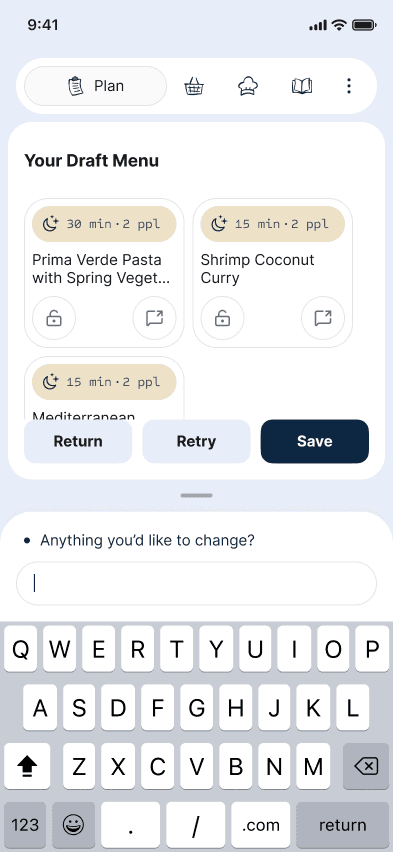
AI-Powered Meal Planning in a Canvas-Chat Interface
Using a double-pane layout inspired by Amie, we achieved a Canvas-Chat pattern on mobile. For Plan, the top pane represents the working meal plan, while the chat is always accessible and works on the Canvas as appropriate.
… and we're live!
We have recently launched on the iOS app store and are eager to hear any and all feedback. Please consider downloading, and feel free to reach out if you have any thoughts, questions, or want to learn more!